Home >

Purpose
As you may already know, on the Circle In platform we have over 700+ expertly curated resources which cover a broad range of topics. As well as being able to search directly on the platform, we have made it easy to view our entire Content Catalogue below, including region specific content.
Action
Access our Content Catalogue below by selecting your region (PW: CircleIn2021):
- Global Content
- Australia Content
- NZ Content
- UK Content
- USA Content
- India Content
- Singapore Content
- Canada Content
When using Airtable follow the instructions below:
- To filter by topic on Airtable select 'Filter' and 'Add a Condition'
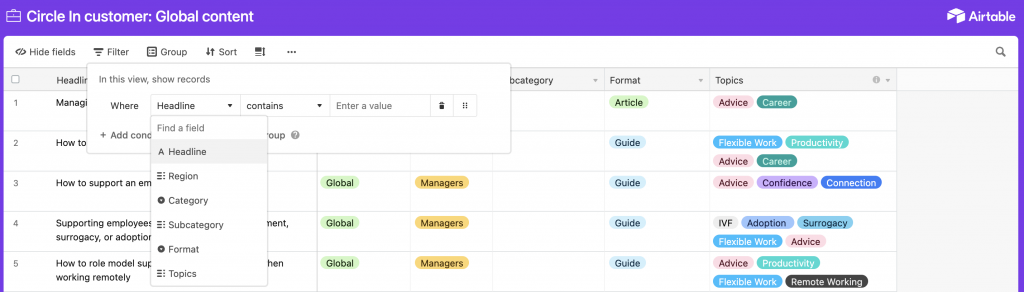
- Select 'Headline' section and choose 'Topics'
- Under 'Select an Option' you can turn on/off which topics you are after
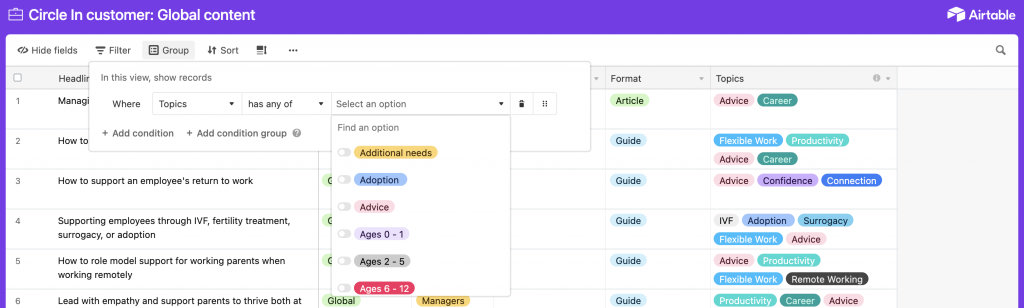
Once you have found the specific content you're after, you can search the headline within the Circle In platform to access the entire resource
Brought to life
Watch the example video below on how to access specific content on topics of interest which you can then use to embed into your policies, newsletters, emails and other communication channels.